Embedded
Embedded
Embedded deployment allows users to integrate trained AI models into embedded systems. Due to the complexity of embedded deployments, upgrading to the Embedded R&D Tier subscription is required. Users must contact Reality AI for assistance, as successful deployment often requires collaboration with the Reality AI team.
Recommendations for Embedded Deployment
Before proceeding with embedded deployment, consider the following best practices to optimize performance and ensure compatibility:
| Recommendation | Explanation |
|---|---|
| Reduce sample rate and window size | Lowering these values minimizes memory and processing requirements while maintaining accuracy. |
| Choose results with lower complexity | In AI Explore, prioritize models with low complexity. If the complexity icon is red, the model may require PC or server-grade hardware. |
| Use training data from the same hardware | Ensure the data used for training matches the hardware and software used in deployment. If necessary, recollect and retrain the model. |
| Test classifier before deployment | Use Test > Try new data and the cloud API to validate the classifier in a controlled environment before deploying it to an embedded system. This helps isolate deployment-related issues from model-related issues. |
Embedded Section
The Embedded section consists of two tabs:
- Create Package – Used to generate a deployable package from a trained model.
- Combine Packages – Allows multiple packages to be merged.
Creating a Package
In the Create Package tab, the Trained Tool section displays the available trained models along with their details:
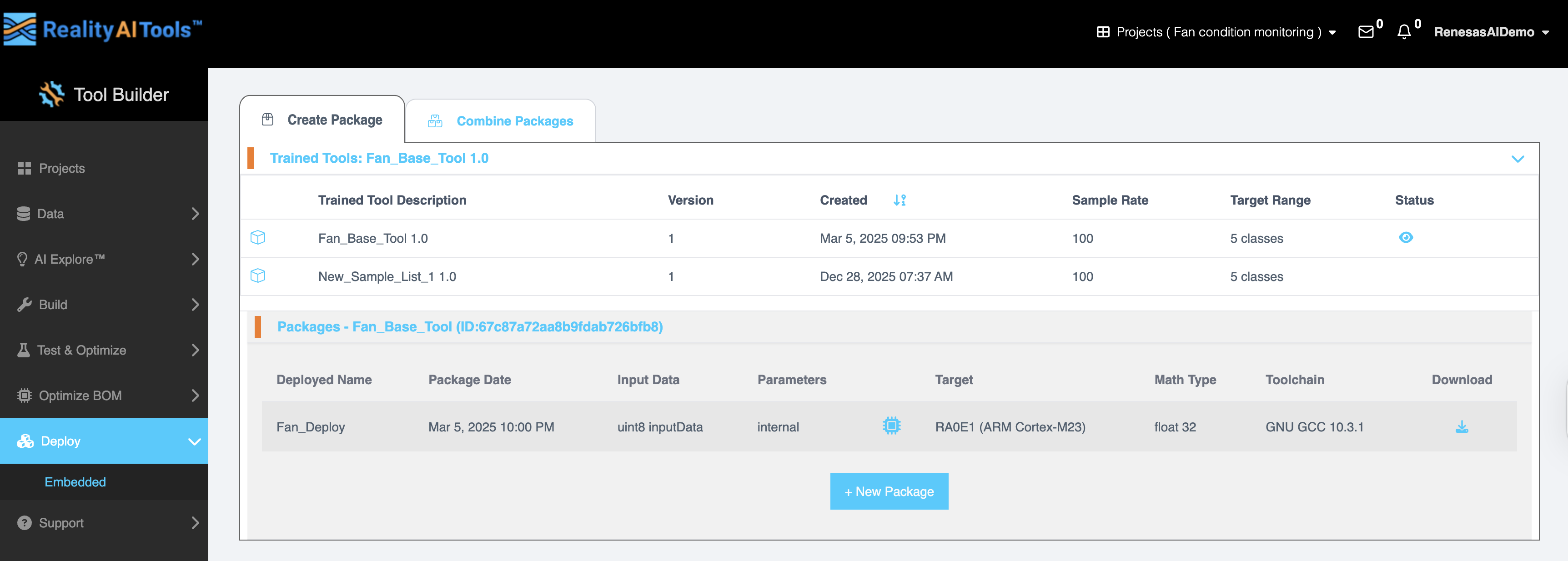
| Field | Description |
|---|---|
| Trained Tool Description | Name of the trained model. |
| Version | Version number of the model. |
| Created | Date and time the model was created. |
| Sample Rate | The frequency at which data is sampled (e.g., 100 Hz). |
| Target Range | The number of classification categories. |
| Status | Indicates the current status of the model. |
Deploying a New Package
Click New Package to open the Deploy New Package page, where you can configure deployment settings.
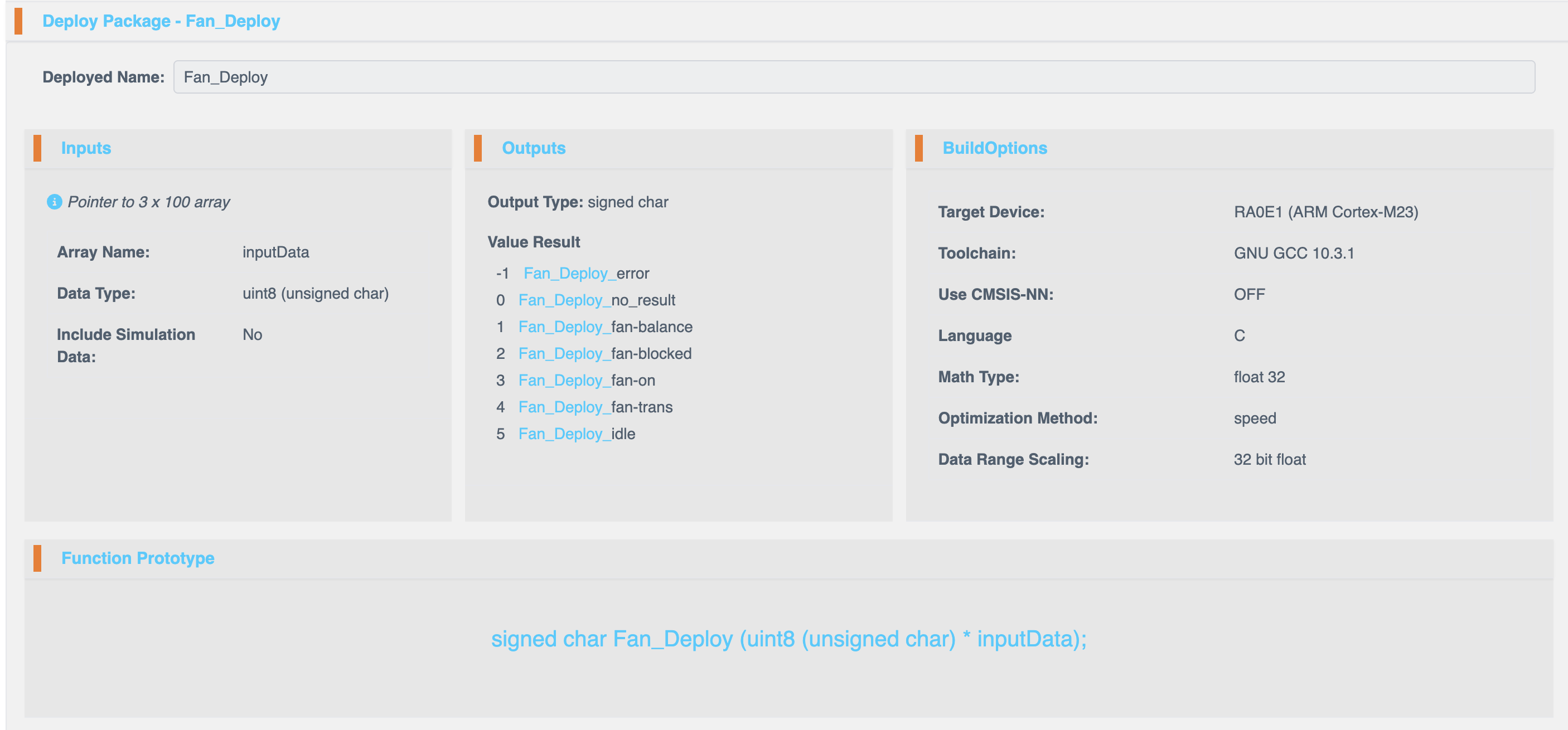
Deployment Configuration
Deployed Name
Assign a custom name for the new package.
Input Configuration
| Field | Description |
|---|---|
| Array Name | Name of the input array. |
| Data Type | Select the data type for input processing. Available options:- uint8 (unsigned char) - int8 (signed char) - uint16 (unsigned short) - int16 (short) - uint32 (unsigned integer) - int32 (integer) - float32 (float) - float64 (double) |
Output Configuration
| Output Type | Possible Results |
|---|---|
| Signed Char | -1: _error, 0: _no_result, 1: _fan_balance, 2: _fan_blocked, 3: _fan_on, 4: _fan_trans, 5: _idle |
Build Options
| Option | Description |
|---|---|
| Target Device | Select the hardware platform for deployment. |
| Toolchain | Choose the compiler toolchain (e.g., GNU GCC 10.3.1). |
| Use CMSIS-NN | Enable or disable CMSIS-NN for neural network acceleration. |
| Math Type | Choose between Fixed Point and Floating Point arithmetic. |
| Optimization Method | Select optimization for Speed (performance) or Size (memory efficiency). |
| Data Range Scaling | Uses 32-bit float representation by default. |
C Function Prototype
The system provides a C function prototype for integrating the deployed model into external applications.
Example:
signed char SampleFandata (float32 *inputData);
Viewing and Downloading Packages
Once a package is created, it will appear in the Packages section with the following details:
| Field | Description |
|---|---|
| Deployed Name | Name of the deployed package. |
| Package Date | Date and time the package was created. |
| Input Data | Format and structure of the input data. |
| Parameters | Specific settings used in the package. |
| Target | The selected target hardware. |
| Math Type | Fixed Point or Floating Point. |
| Toolchain | The compiler toolchain used. |
| Download | Option to download the package as a ZIP file. |
Viewing Hardware Resource Usage
Click the microcontroller icon next to the target to view:
| Metric | Description |
|---|---|
| RAM Usage | Pre-allocated memory and stack usage. |
| Storage (FLASH/ROM) | Breakdown of parameter and code sizes (in bytes). |
| Inference Output Validation | Displays classification accuracy as a percentage. |
By following these steps, you can successfully configure and deploy AI models into embedded environments, ensuring optimal performance and accuracy. For additional assistance, contact Reality AI Support.