MCU/MPU Selection
This section provides an option to select the appropriate Renesas product for your project by filtering based on processor families, memory requirements, and other parameters. Here's a breakdown of the process:
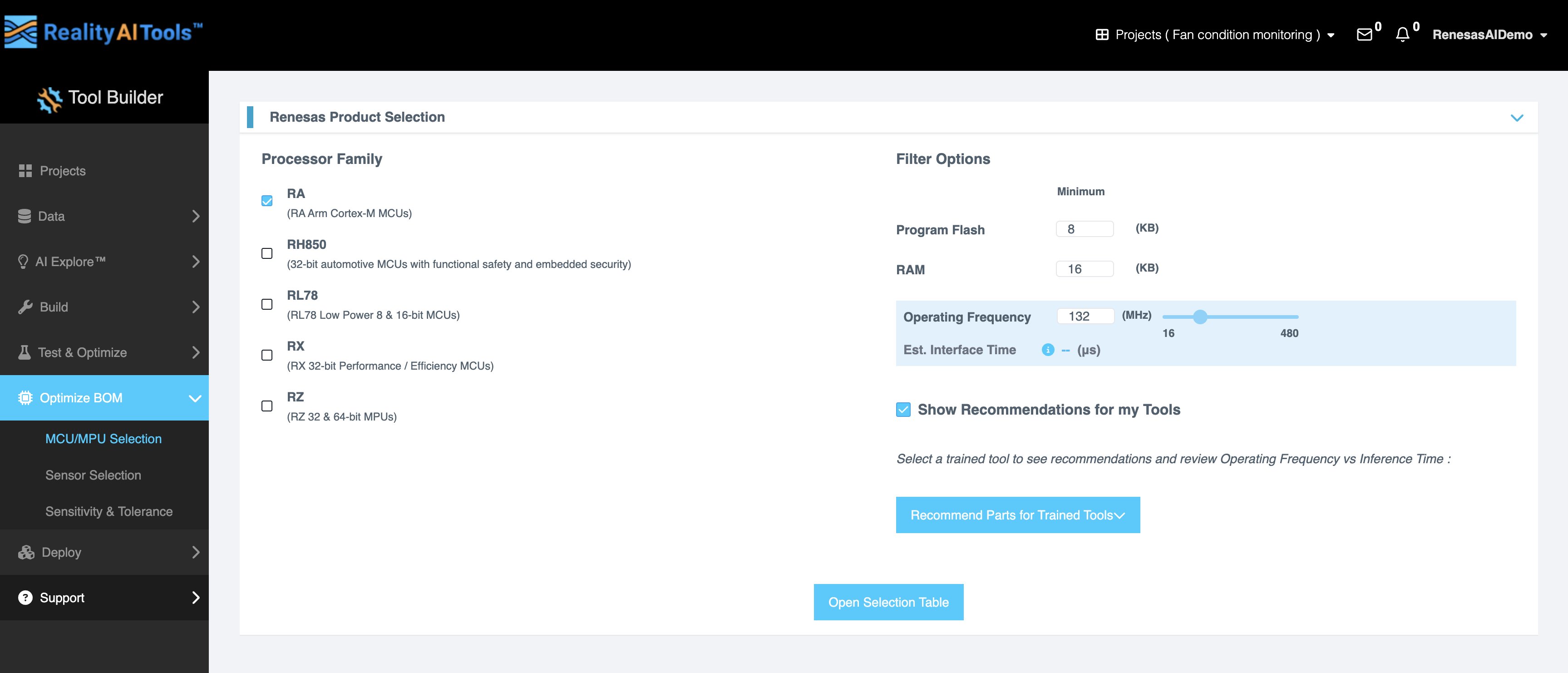
- Choose from the following processor families:
- RA: ARM Cortex-M MCUs
- RH850: 32-bit automotive MCUs with functional safety and embedded security
- RL78: Low-power 8 & 16-bit MCUs
- RX: 32-bit performance and efficiency MCUs
- RZ: 32 & 64-bit MPUs
- Select the required Filter Options:
- Program Flash (KB): Set the desired minimum flash size in kilobytes.
- RAM (KB): Set the minimum RAM size in kilobytes.
- Operating Frequency (MHz): Enter a specific value or use the slider to select a range between 16 MHz and 1800 MHz.
- Estimated Interface Time: The time is shown in microseconds. This will be autoestimated based on the parts you choose for your trained tools.
- Enable the Show Recommendations for my Tools checkbox to view recommendations based on your selected tool. This will display the operating frequency and inference time comparison for the tool.
- Select a trained tool to see its minimum program flash and RAM requirements. The Math Type can toggle between float 32 and fixed Q15.
- Click Apply to confirm your selections.
- For more detailed browsing, click the Open Selection Table button to access the Renesas product selector site.