Profile
To access your profile:
- Click your User Name in the top-right menu.
- Select Profile from the dropdown menu.
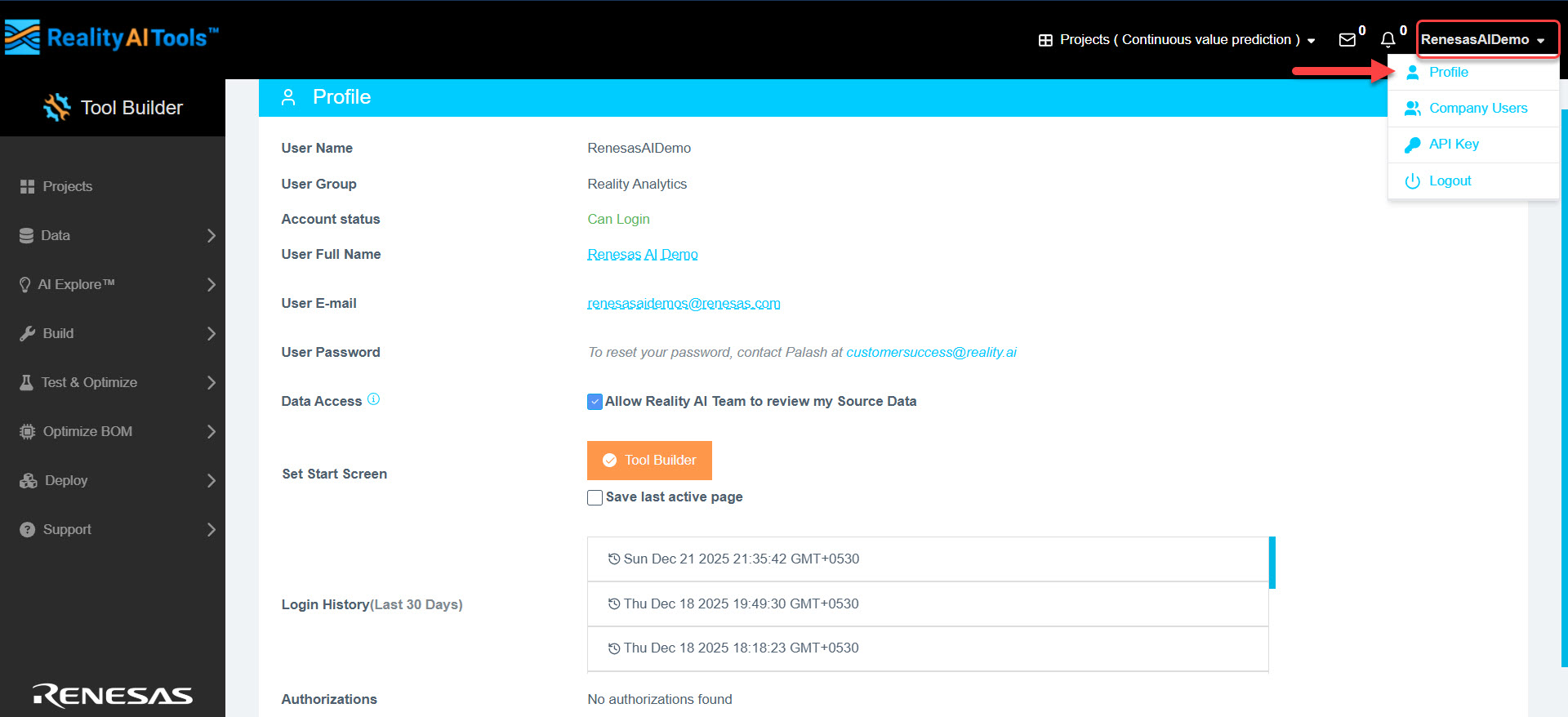
Profile Information
The Profile page provides the following details:
| Field | Description |
|---|---|
| User Name | Displays your username. |
| User Group | Shows the group or role you are assigned to. |
| Account status | Indicates whether your account is in Can Login, Can Login Suspended, or Disabled Login state. Your admin can set your permissions as Suspended, Read Only, Enable Login, or Enable Toolbuilder. |
| User Full Name | Your full name as registered. |
| User E-mail | Your registered email address. |
| User Password | To reset your password, contact customersuccess@reality.ai |
| Set Start Screen | Set Tool Builder as your default start screen. Alternatively, select the checkbox Save last active page to have the system load your last active page as the start screen upon your next login. |
| Login History | View your login history for the past 30 days. |
| Authorizations | Review the permissions and authorizations available to you within the software. |
Subscription Details
To view your subscription details, click the Review Plan button at the bottom of the Profile page. This will take you to a page displaying the following information:
- Subscription Plan
- Subscription Start and End Date
- Initial Term and Renewal Term
- Subscription Fee and Billing Period
- Included Volume of Classification Job Calls via API (per month)
- Volume Overage Charges
- Response Time SLA
- Plan Usage (Tool Usage and File Usage)
You will also have the option to upgrade your plan if needed.