Performing Hardware In-Loop Testing
The Reality AI Hardware In-Loop (HiL) Testing tool enables users to test trained AI models directly on hardware. This process helps evaluate model performance, including average inference time and overall accuracy, using simulation data from Reality AI Tools.
-
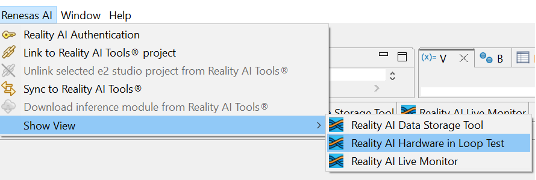
Navigate to Renesas AI > Reality AI > Show View > Hardware In-Loop Test.
-
Select the trained model from your Reality AI Tools account using the Select Inference Package button.
 If you have Explorer Tier access, select the required model.
 -
Ensure the board is connected.
-
Click Start HiL Testing.
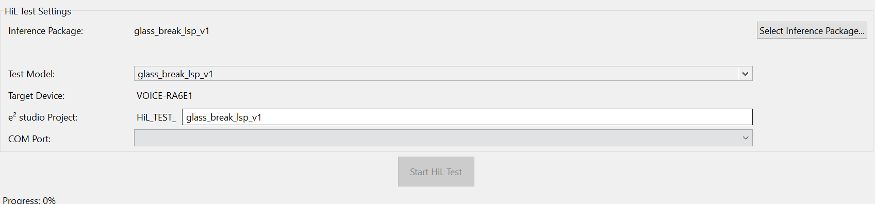
| Specification of HiL Test Settings | Description |
|---|---|
| Inference Package | Lists available deployed models for selection along with the Package Date, Data Type and Target. |
| Test Model | Displays the trained model selected for testing. |
| Target Device | Shows the hardware board where the model is deployed. |
| Project | References the project directory generated for the test. |
| COM Port | Displays the communication port used for hardware interaction. |
| Progress | Indicates the current test progress status. |
| Test Dataset | Selects trained dataset as default. |
The plugin will:
- Generate a project on your drive for hardware testing.
- Download and use simulation data to test the model.
- View Inference Time and Overall Accuracy on the screen.
| HiL Test parameters | Description |
|---|---|
| Avg. Inference Time (ms) | Displays the average time (in milliseconds) taken for model inference. |
| Overall Accuracy (%) | Shows the percentage accuracy of the model based on the test dataset. |
| Memory resource usage | Shows the memory requirement for the selected model/inference package. |
